Week 04
Critique:
Shot 1
Ends too abruptly. Think about camera movement; adding an ease out or a slight track would help.
Textures need work
Work on transition between shot 1 and 3. Keep the camera roll, but make it make sense for shot 3 intro.
Shot 3 (flower)
Generate more concepting to lock down the vibe you want
Like the switch back to the flower
Make sure it's movements are organic and realistic
Feel the weight of the ring
More natural drop
Shot 2 (water/bubbles)
Pay attention to the color of the ring
bubbles look too thin
Shot 5 (break apart)
Get a motion media artist on the team; the 'omni' reveal needs to be killer
Color is too saturated compared to the other pastels
Motion blur
motion vector AOV isn't going to work well when lots of things are moving fast (shot 2), because of the variables it uses to calculate them.
Motion blur should likely be in render
Shot 1:
This shot clearly needed a lot of work, as the mentors stated! After talking with professor Fowler, I made the ring switch into an RBD as it falls, to look more realistic.
As I'm not super skilled or familiar with Houdini I ran into a few issues, like switching between the animated ring and the simulated ring, and how to apply the materials to each primitive while still keeping the ring packed into one primitive for the RBD.

Not sure if this is the correct way to name the primitives to be later referenced when connecting materials, but this method worked. Shout out to Max Jokinen for helping me out with the RBD switch, and for lending me his file to see how he handled this issue!
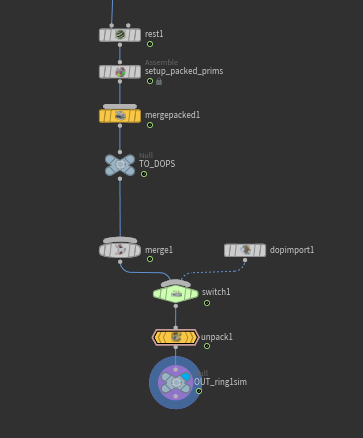
The yellow nodes are the ones I needed. Again, likely not the cleanest method, but it worked :)
Since Noelle was pretty swamped with lookdev work, now that we decided to switch back to the flower idea, I created the texture for the pedestal.
I generated a Terrazzo texture using Gemini, cleaned it up and upscaled it a bit in photoshop, then used Adobe Substance Surfacer to generate texture maps with that one image!

Output from Gemini

Prompt given to Gemini

Modified in Photoshop (upscaled and denoised, mostly)

AI generated texture maps, color corrected.

Lastly for shot 1, I slowly pulled back the camera, as per mentor advice, to keep the visual momentum. Not sure if this fixed the issue, so I'm eager to hear what the mentor's think!
I also quickly animated Gracie's new flower shot, to aid the transition between that shot and shot 1. It definitely needs more refining, and I expect lots of critique on it!
I also started the generation on the backgrounds for each shot, using Gemini and modifying them in nuke!


I think this is a great fit for our opening and closing shots! I desaturated it in the comp, but I like the 'warm lighting' it brings

Still not sure about this one for the flower shot. We'll see what the mentors say, and I'll make sure to ask for the Professors' advice.


This background has a slight canvas texture to it that doesn't mesh well with the water shot, so it'll likely get replaced
Savannah had some snow this weekend, which meant that all school buildings were closed Saturday and Sunday, the times when we have the most time to work! The team was definitely impeded by this, as most of our members don't have PCs that can handle the work we need to do. We're still in a good place, but we need to focus a lot on refining everything this coming week!
